What Is Zero-Knowledge Photo Storage?
Learn what zero-knowledge photo storage means, how it works, why privacy-focused users prefer it, and how encryption can help protect private photos and videos from unauthorized access.
“The goal of zero-knowledge storage is simple: store your data without being able to read it.”
By Sixbytes
Privacy-conscious users often ask an important question:
Can the company storing my photos see them?
For traditional cloud services, the answer can sometimes be complicated.
For zero-knowledge systems, the goal is much simpler:
The provider should not be able to read your photos at all.
This idea has become one of the most important concepts in modern privacy-focused storage systems.
Understanding how it works can help you make better decisions about protecting your private photos and videos.
What Does "Zero Knowledge" Mean?
The term "zero knowledge" refers to a storage architecture where the service provider stores your encrypted data but does not have the information required to decrypt it.
In simple terms:
You can view your photos.

The server stores your photos.

The server cannot read your photos.
This is the core idea behind zero-knowledge storage.
The provider has "zero knowledge" of the contents.
Why Traditional Storage Requires Trust
In many traditional systems:
- Photos are uploaded.
- The provider stores them.
- The provider manages part of the security process.
This can work well, but it requires trust.
Users must trust that:
- Employees cannot access files.
- Systems are configured correctly.
- Security controls remain effective.
Many providers take security seriously, but privacy-conscious users often prefer systems that reduce the need for trust altogether.
How Zero-Knowledge Storage Works
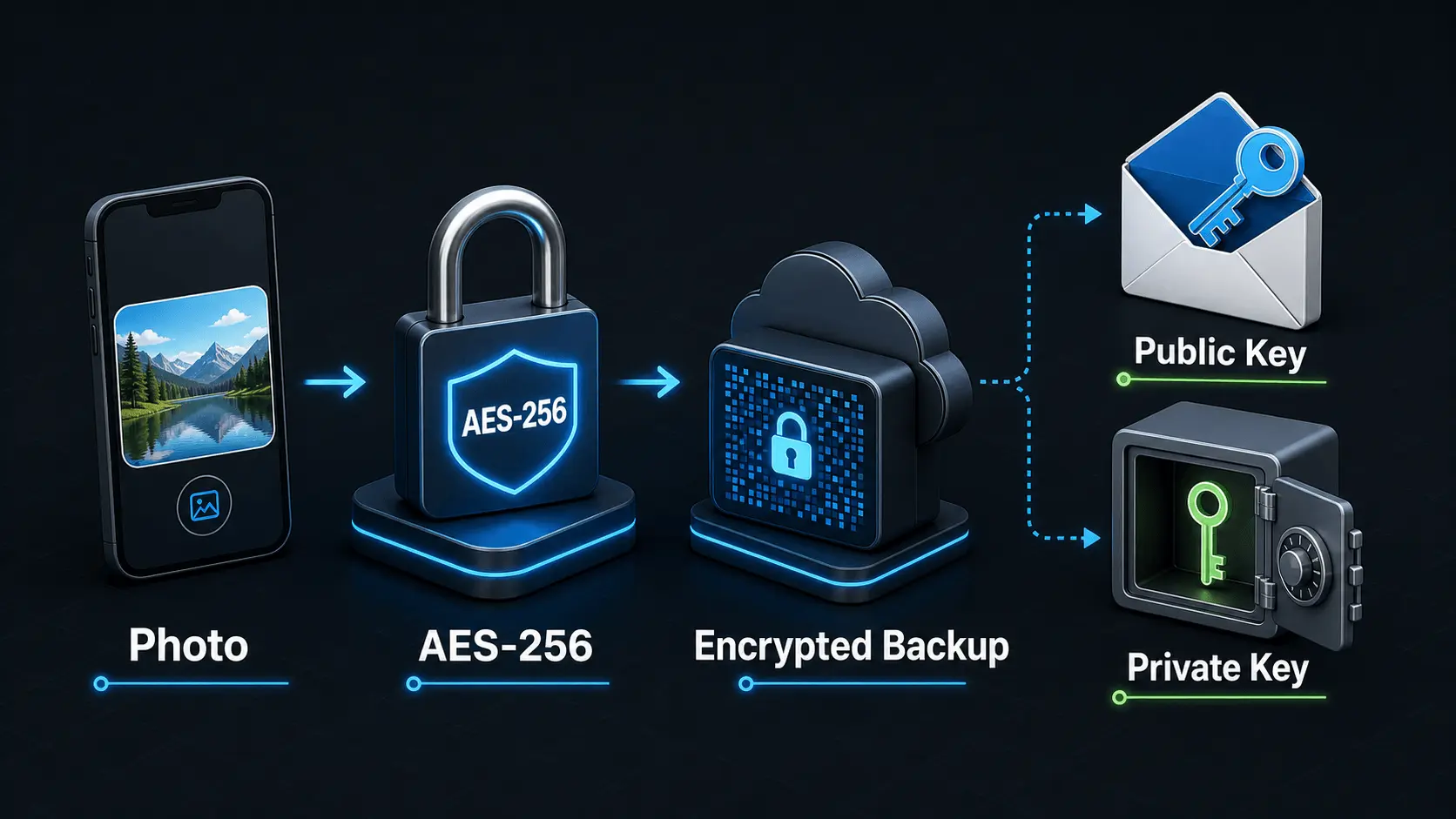
Zero-knowledge systems attempt to remove provider visibility through encryption.
A simplified workflow looks like this:
Step 1: Select a Photo
You choose a photo or video to protect.
Step 2: Encrypt on Your Device
Before the file leaves your device:
- Encryption occurs locally.
- A secret encryption key is used.
- The original file becomes encrypted data.
Step 3: Upload Encrypted Data
The server receives:
Encrypted Data
instead of:
VacationPhoto.jpg
Step 4: Store the Backup
The encrypted file is stored on the server.
Without the proper keys, the contents remain unreadable.
Step 5: Decrypt on Your Device
When restoring:
- The encrypted file is downloaded.
- Your device performs decryption.
- The original photo becomes viewable again.
Throughout this process, the provider never needs access to the decrypted content.
Why Encryption Passwords Matter
Zero-knowledge systems depend heavily on encryption credentials.
Many designs use an Encryption Password to help derive the keys required for decryption.
This creates an important privacy advantage:
The provider does not need your password.
However, it also creates an important responsibility:
You must protect that password.
Without it, recovery may be impossible.
The Warehouse and Safe Analogy
A useful analogy is a warehouse full of locked safes.
Imagine:
- You own the safe.
- The warehouse stores the safe.
- Only you have the combination.
The warehouse operator can:
- Store the safe
- Move the safe
- Return the safe
But cannot:
- Open the safe
- Read its contents
That is the basic idea behind zero-knowledge storage.
Benefits of Zero-Knowledge Photo Storage
Stronger Privacy
The provider cannot easily view stored files.
Reduced Trust Requirements
Security depends less on organizational policies and more on cryptographic protections.
Better Protection During Breaches
If encrypted data is exposed, attackers still need the correct keys.
Greater User Control
Users maintain greater responsibility for access to their own data.
Tradeoffs of Zero-Knowledge Storage
No system is perfect.
Zero-knowledge designs introduce tradeoffs.
Password Recovery Becomes Difficult
If the provider does not know your password, it cannot simply recover it for you.
More User Responsibility
Users must protect:
- Passwords
- Recovery keys
- Backup information
Increased Complexity
Some users prefer simpler systems even if they require more trust.
Privacy and convenience often exist on a spectrum.
Zero-Knowledge vs End-to-End Encryption
These terms are related but not identical.
End-to-End Encryption
Focuses on protecting data while it moves between devices.
Zero-Knowledge Storage
Focuses on preventing the provider from accessing stored content.
Many privacy-focused systems use both approaches together.
Why Photo Vault Users Care About Zero Knowledge
Private photo libraries often contain:
- Personal memories
- Family archives
- Medical records
- Financial documents
- Identification documents
Many users simply want assurance that nobody else can view these files.
Zero-knowledge storage helps address that concern by reducing provider visibility.
How Safety Photo+Video Approaches Privacy
Safety Photo+Video focuses on helping users maintain control over their private media through:
- Local storage options
- Cloud backup options
- Encryption-focused architecture
- Multiple privacy layers
As future zero-knowledge capabilities evolve, the goal is to strengthen the separation between stored data and provider access.
The objective remains consistent:
Protect user privacy without sacrificing recovery capabilities.
Common Misconceptions
Myth: Zero-Knowledge Means No Backup
False.
Zero-knowledge systems can still provide cloud backup functionality.
Myth: Zero-Knowledge Means No Recovery
Not necessarily.
Recovery mechanisms may exist, but users often bear greater responsibility.
Myth: Encryption Alone Creates Zero Knowledge
Not always.
Key management is equally important.
Myth: Only Large Companies Use Zero Knowledge
False.
Modern privacy-focused applications increasingly adopt zero-knowledge principles.
Should You Choose Zero-Knowledge Storage?
Zero-knowledge storage may be valuable if you:
- Prioritize privacy
- Store sensitive media
- Want stronger control over access
- Prefer minimizing provider visibility
It may be less important if convenience and simplified recovery are your primary goals.
The right choice depends on your personal balance between privacy and usability.
Final Verdict
Zero-knowledge photo storage is one of the strongest privacy models available today.
Instead of asking users to trust that providers will not access their files, the architecture is designed to make access technically difficult or impossible.
The result is a system where:
- Users control access.
- Providers store encrypted data.
- Private photos remain private.
As privacy expectations continue to evolve, zero-knowledge designs are likely to play an increasingly important role in how personal photos and videos are protected.
Frequently Asked Questions
Protect your private photos and videos
Download Safety Photo+Video for a private media vault with flexible locks and optional zero-knowledge encrypted backup.
Available for iPhone, iPad, and Android.
Related Articles
How Does Encryption Work?
A simple explanation of how encryption protects private photos and videos, how AES-256 works in Safety Photo+Video, and how encryption passwords, public keys, and private keys fit together.
Read articleCan Photo Vault Apps See My Photos?
Learn how photo vault apps store photos, when providers can access your data, how encryption works, and what to look for when choosing a privacy-focused photo vault.
Read articlePrivate Photo Backups: A Practical Starting Guide
A practical guide to building a private photo and video backup routine that protects sensitive media, stays current automatically, and gives you a clear restore plan before a device is lost, damaged, or replaced.
Read article