How Does Encryption Work?
A simple explanation of how encryption protects private photos and videos, how AES-256 works in Safety Photo+Video, and how encryption passwords, public keys, and private keys fit together.
“Encryption turns a readable photo or video into data that looks useless without the right key. The file can still be stored and backed up, but it cannot be understood until it is unlocked by you.”
By Sixbytes
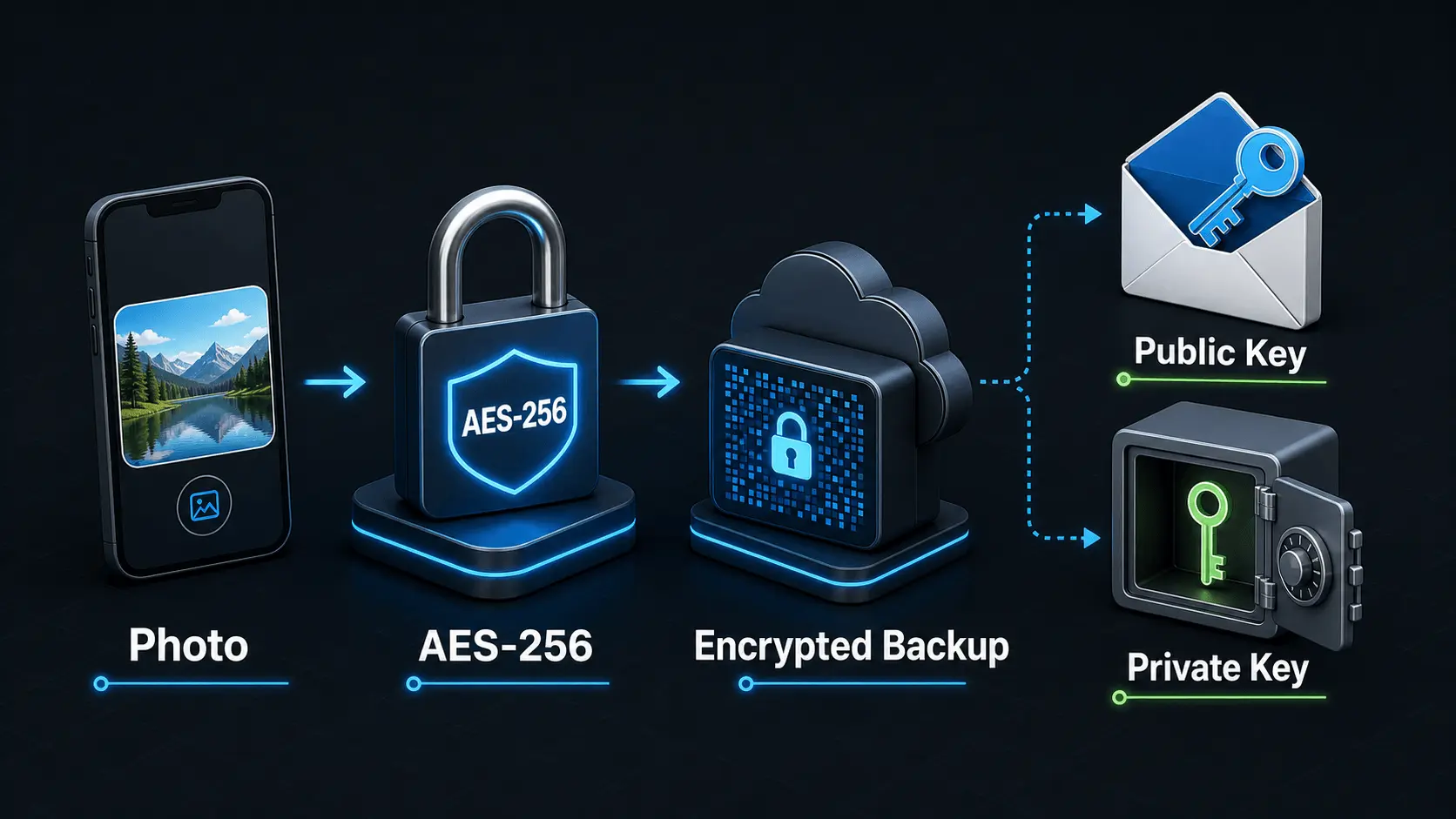
Encryption can sound abstract, but the basic idea is simple. A photo or video starts as readable data. Encryption uses a secret key to scramble that data into something that looks meaningless. Later, the right key can turn it back into the original file.
That matters for private media because a backup is still a copy of your life. It may include family photos, personal documents, project evidence, receipts, medical images, screenshots, and videos you would not want exposed. Encryption helps make sure the backup is useful to you without becoming readable to everyone who might touch the storage system.
The image above is a simplified mental model. Your photo is protected with strong encryption before it becomes an encrypted backup. Keys control who can unlock the data. Some keys can be public or shareable in limited ways, but the private key material and your Encryption Password must stay private.
Start With Plain Data
Every photo and video is made of data. A photo file contains pixels, metadata, timestamps, thumbnails, and other information that software can read. If that file is stored without encryption, anyone with the right access to the file can potentially open it.
Encryption changes the file before it is stored or transmitted. Instead of placing the readable photo into backup storage, the app stores encrypted data. The encrypted version is still a file, but it no longer behaves like the original photo. A normal photo viewer cannot understand it. A person looking at the stored data should not be able to tell what the image contains.
This is why encryption is different from a normal sign-in. A sign-in controls who can enter an account. Encryption protects the data itself, so the stored backup remains protected even if someone is looking at the wrong layer of the system.
The Key Is What Makes Encryption Work
Encryption depends on keys. A key is not usually a metal-key-shaped thing, even though that is the easiest picture to remember. In cryptography, a key is a highly specific value used by an algorithm to lock or unlock data.
If the key is correct, the encrypted file can be decrypted back into the original photo or video. If the key is wrong, the result is useless. This is why small password differences matter. One different character, a missing space, or the wrong capitalization can lead to a completely different key.
Safety Photo+Video uses an Encryption Password as part of this protection model. Your password is used on your device to derive strong encryption keys. That lets the app work with cryptographic keys while you only need to keep track of a password or passphrase.
Why AES-256 Is Used For Photos And Videos
AES stands for Advanced Encryption Standard. It is a symmetric encryption algorithm, which means the same secret key is used to encrypt and decrypt the data. Symmetric encryption is fast, reliable, and well suited for large files such as photos and videos.
Safety Photo+Video uses AES-256-GCM for file encryption. The 256 part means the key is 256 bits long. That is an extremely large key space, far beyond what can be searched by guessing when the keys are generated and protected properly.
The GCM part is also important. AES-GCM is an authenticated encryption mode, which means it does two jobs at once:
- It keeps the file contents private.
- It helps detect whether encrypted data was changed or tampered with.
Think of AES-256-GCM as a secure container for each protected file. The photo or video goes in readable, comes out scrambled, and can only be restored when the right key is available.
How Your Encryption Password Becomes A Key
People are better at storing passwords than raw cryptographic keys. Computers need exact key material. A key derivation function connects those two worlds.
In Safety Photo+Video, your Encryption Password is used with PBKDF2-SHA256 to derive a 256-bit master key. In plain language, that means the app takes your password and processes it in a deliberate, repeatable way to produce key material suitable for encryption.
This matters for two reasons. First, the app can use strong keys without asking you to memorize a long stream of random bytes. Second, the password remains central to recovery. If you enter the same correct Encryption Password later, the app can derive the right key material again. If the password is lost or entered incorrectly, the encrypted library cannot be safely unlocked.
That is why your Encryption Password is not just another account password. It is connected to the ability to read your protected files.
Public Keys And Private Keys
Public and private keys are part of asymmetric encryption. Instead of one shared secret key, asymmetric encryption uses a pair of related keys:
- The public key can be shared more openly.
- The private key must stay secret.
A common way to think about it is a mailbox. Anyone can put a message into the mailbox if they know where it is, but only the person with the private key can open the mailbox and read what is inside.
This is different from AES. AES is usually used for the actual file contents because it is fast for large data. Public/private key cryptography is often used for smaller pieces of information, identity checks, secure key exchange, or protecting the keys that unlock larger encrypted data.
So the practical picture looks like this: AES protects the heavy photo and video data, while password-derived keys and private key material control who can unlock or recover access. The public key side may be safe to use for locking or verification, but the private key side must be protected carefully.
What Zero Knowledge Means
Zero knowledge means the service does not need to know the contents of your library in order to store it. The server can hold encrypted backups, sync status, account records, and other operational data without being able to open your private photos and videos.
In a zero-knowledge design, your Encryption Password does not leave your device, and the service does not store the keys needed to decrypt your library. That creates a strong privacy boundary. Even if encrypted backup data is present on a server, it should remain unreadable without the correct password and key material.
The tradeoff is recovery responsibility. If the service cannot see your password, it also cannot recover it for you. This is good for privacy, but it makes your password storage habit very important.
What Happens During Backup
The exact interface may feel simple, but several security steps happen behind the scenes:
- The app prepares the photo or video for backup.
- Encryption keys are derived or selected on your device.
- The file is encrypted with AES-256-GCM.
- The encrypted version is uploaded or stored.
- The readable original is not what the backup service receives.
From your point of view, the backup may look like a normal upload. From the storage system's point of view, the protected file should look like encrypted data. That is the point. The backup can still be stored, synced, and restored, but it should not be readable without your key.
What Happens During Restore
Restore runs the process in the other direction. The app downloads or locates the encrypted backup data. Then it needs the correct Encryption Password and key material to decrypt the files. Once the file is decrypted, the app can show the photo or video again.
This is why restore preparation matters. The account helps the app find the backup. The device and network help retrieve it. The Encryption Password helps unlock it. Missing any one of those pieces can make a restore slower, confusing, or impossible.
If support is helping you troubleshoot, they can work with account details, app version, device model, error messages, and backup status. They should not need your Encryption Password. Keeping that password private keeps the protection model intact.
A Simple Way To Remember It
Encryption is easiest to understand as a chain:
- Your photo or video starts as readable data.
- AES-256-GCM turns it into encrypted data.
- Your Encryption Password helps derive the keys needed to unlock it.
- Public keys can help lock or verify in certain systems.
- Private keys and password-derived keys must stay secret.
- Restore works only when the right account, backup, device, and key material come back together.
The goal is not to make backup feel complicated. The goal is to make private backup trustworthy. When encryption is working well, your files can travel to backup storage while staying unreadable to anyone who does not have the right key.
Frequently Asked Questions
Protect your private photos and videos
Download Safety Photo+Video for a private media vault with flexible locks and optional zero-knowledge encrypted backup.
Available for iPhone, iPad, and Android.
Related Articles
Why Your Encryption Password Matters
Learn why your Encryption Password is central to private photo and video protection, how it differs from an account password, and which habits help you keep it strong, private, and recoverable.
Read articlePrivate Photo Backups: A Practical Starting Guide
A practical guide to building a private photo and video backup routine that protects sensitive media, stays current automatically, and gives you a clear restore plan before a device is lost, damaged, or replaced.
Read article