Private photo & video vault

Hide and lock
your private photos
and videos.

Keep personal media separate from your everyday photo library with Safety Photo+Video. Protect your vault with a passcode or supported biometric unlock, add passwords to individual albums, and use a separate decoy vault for extra privacy.

Optional zero-knowledge backup when you need an encrypted copy beyond your device.

Private albums. Flexible locks.
Backup is your choice.
Safety Photo+Video tablet app icon

Safety Photo+Video

Private vault

Optional

Encrypted Backup

Access

Passcode

Safety Photo+Video LogoSafety Photo+Video
JS
Photos
Videos
Favorites
Private
Camera
Travel
Family
Photos
Videos
Private albums
Why a private vault?

Your private library, separate from everyday photos

Keep selected photos and videos in a separate library, with flexible access controls and optional backup when you need it.

Your Private Library

Import selected photos and videos, then organize them into private albums.

Lock Your Vault Your Way

Use a passcode or supported biometric unlock. Available options depend on your device and app version.

Individual Album Passwords

Give a sensitive album its own password for an additional access step inside your vault.

Separate Decoy Access

A different password opens a separate decoy vault, away from your main private library.

Optional Cloud Backup

Choose optional zero-knowledge backup when you want an encrypted copy beyond your device.

You're in Control

Importing does not remove originals everywhere. Verify your imported files and keep a good backup before any cleanup.

See the privacy difference

Privacy you can see at every step.

Start with a dedicated private vault, organize the media you choose, and add optional encrypted backup only when you need it.
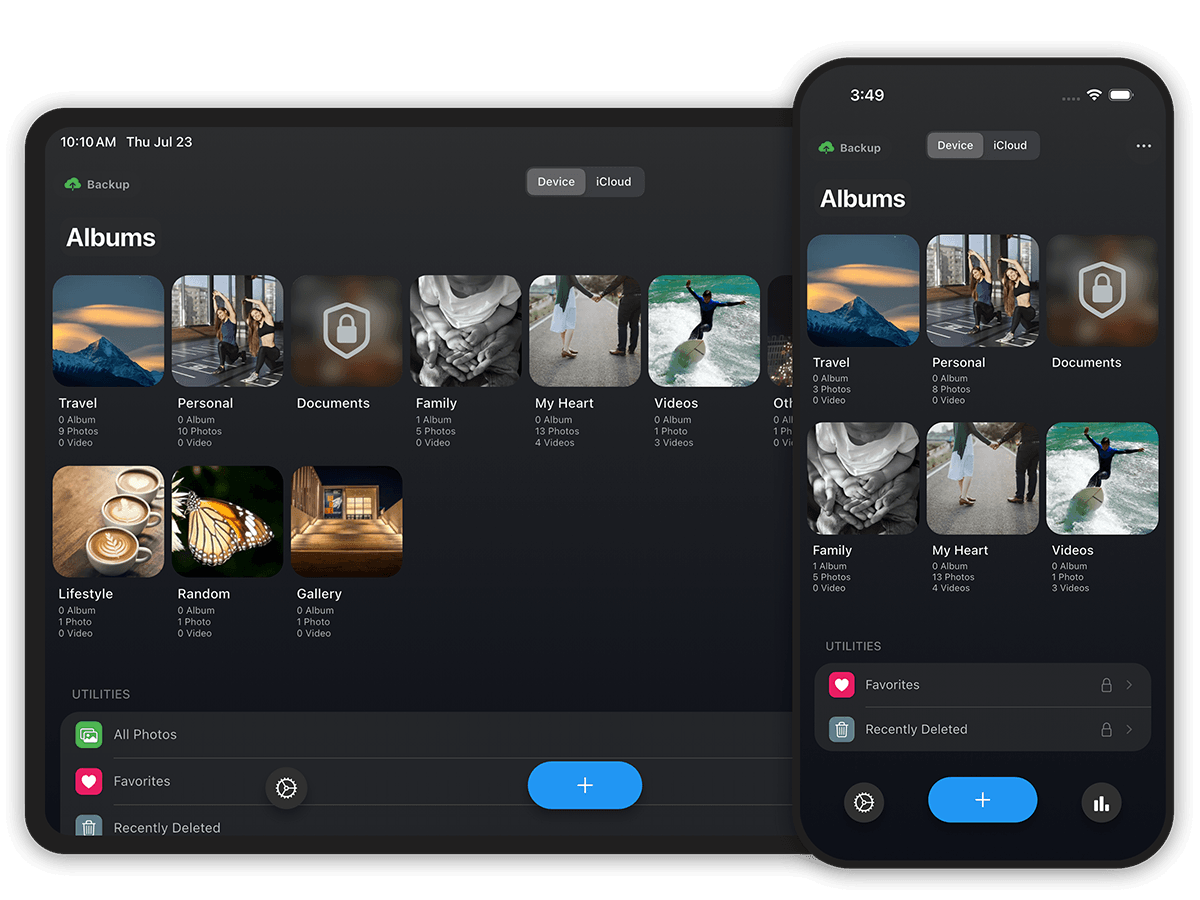
Product preview
01 / 04

Private vault

Your private library, organized your way.

Keep selected photos and videos in a separate private library, organized into albums inside Safety Photo+Video.

Organize private photos, videos, and sensitive documents
iPhone & iPad screens
Safety Photo private vault with protected photo and video albums
Features

More Ways to Protect Your Private Media

Start with vault access, then add individual album passwords and decoy access for extra privacy.

Lock Your Vault Your Way

Protect access with a passcode or supported biometric unlock. Available options vary by device and app version.

Passcode & supported biometrics

Give Albums Their Own Password

Add a password to an individual album, such as a personal document collection, for another access step inside your vault.

Individual album protection
Extra privacy

A Different Password, a Different Vault

Use a separate decoy password to open a different vault. Keep everyday pictures there, apart from the media in your main library.

Separate decoy access
Backup & Security

Add Optional Backup Without Giving Up Control

Choose an encrypted copy beyond your device when you need it. Backup is optional.

Your Backup Stays Under Your Control

When zero-knowledge backup is enabled, protected media is encrypted on your device before upload. Access to the protected backup requires the user-controlled password or recovery information used by the app.

Protected backup files are encrypted before upload
Backup access requires user-controlled credentials
Encrypted cloud backup is optional
Support cannot recover your Encryption Password

Before restoring: you need an available, completed compatible backup, the required account credentials, and the password or recovery information required by the app. Device storage, iCloud features, and Safety Photo+Video cloud backup have separate encryption and recovery behavior. Read our security documentation and recovery checklist.

Privacy & Trust

Privacy You Can Verify

Safety Photo+Video separates the private-vault experience from optional cloud backup. We publish clear privacy, security, retention, and recovery information so you can understand what is protected and what is required.

Private media is not used for AI training
Encrypted cloud backup is optional
Backup access requires user-controlled credentials
Local, iCloud, and app cloud backup are separate
Public privacy, terms, and security documentation
Expired cloud backup is retained for 90 days

Your Device

Protected backup content is encrypted before upload

Encrypted Before Upload

Encrypted Cloud Backup

Protected backup data is stored for restore

User-Controlled Access
Review Highlights

Why People Choose Safety Photo+Video

Users who want more than a hidden album choose Safety Photo+Video for private photo vault storage, with additional album protection, decoy access, and optional encrypted backup.

Private photo & video vault

Keep personal photos and videos separate from your everyday library with dedicated vault protection, flexible locking, private albums, and decoy access.

User priority

Hides and locks private media

Optional zero-knowledge backup

Add encrypted cloud backup when you want extra protection. Protected backup content is encrypted before upload and requires your user-controlled credentials or recovery information to unlock.

User priority

Adds encrypted backup when needed

Restore on a new device

When a compatible encrypted backup is available, restore your protected photos and videos after changing to a new supported iPhone or Android device.

User priority

Helps restore protected backups

Comparison

Safety Photo+Video vs Cloud Photos and Hidden Albums

Compare a dedicated vault with general cloud-photo services and built-in hidden albums. Exact access, authentication, encryption, sync, and recovery behavior depends on each product and its settings.

Separate private photo and video vault
Dedicated private library
General photo storage and sharing
Private area within the existing photo library
Dedicated vault access
Passcode and supported biometric access
Depends on account, device, and service settings
Depends on device and platform authentication
Individual album passwords
Available for additional album-level protection
Depends on the service
Not generally part of the standard hidden-album workflow
Separate decoy access
A different password can open a separate decoy vault
Not a typical cloud-photo feature
Not a typical built-in hidden-album feature
Optional encrypted backup
Available as a separate backup choice
Depends on provider, plan, and settings
Depends on device and cloud configuration
Typical use
Separate private media library; backup optional
Everyday storage, search, sharing, and sync
Hide selected items inside the existing library
FAQ

Frequently Asked Questions

Practical answers about the private vault, optional backup, and recovery.

Available Now

Keep Your Private Media Private

Hide and lock personal photos and videos with Safety Photo+Video. Private albums. Flexible locks. Backup is your choice.

Private Albums
Optional Encrypted Backup